
Quick-Session Idle Farming with Pixel Pets
Overview
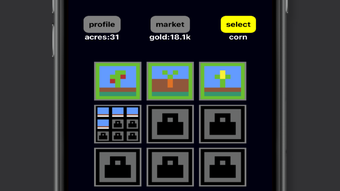
Cube Farm is a free simulation game designed for fans of idle gameplay, offering a relaxed and accessible experience centered around farming and pet training. The game combines simple mechanics with retro pixel graphics, delivering a low-effort playthrough ideal for short breaks or casual gaming sessions. Players cultivate crops, manage farm platforms, and harvest yields to unlock and train pets, which can later be deployed in battles.
The game emphasizes skill-based progression without relying on ads or pay-to-win elements, ensuring a balanced and fair experience. Its quick-session nature means players can start and stop without long waiting periods, making it suitable for users seeking a distraction-free, undemanding game. While the visual style is intentionally minimalistic, it enhances the nostalgic appeal of retro gaming.
The game is built for both Windows and Mac, catering to desktop users who enjoy lightweight, accessible titles. The developer did not provide additional information about their background or development history. Real-world usage scenarios include casual downtime, stress relief, and short entertainment sessions during work or study breaks.
Despite its simplicity, the game maintains a consistent loop of planting, growing, harvesting, and training, creating a satisfying rhythm for idle game enthusiasts.
Key Features & Capabilities
- Idle Farming Mechanics – Players plant crops on layered platforms, watch them grow over time, and harvest them for resources. The system is designed for quick sessions, allowing players to return and collect yields without long wait times.
- Pet Training and Deployment – Harvested resources unlock pets that can be trained and upgraded. These pets are then used in battles, adding a strategic layer to the idle progression loop.
- Pixel-Style Retro Aesthetic – The game uses a minimalist pixel art design, contributing to a nostalgic and visually consistent experience. The low-end graphics are intentional and align with the game’s casual nature.
- No Ads, No Paywalls – The game operates without advertisements or in-app purchases, ensuring that progression depends solely on player strategy and timing rather than spending.
- Quick-Session Gameplay – Designed for short bursts of play, the game allows users to engage for a few minutes without needing to commit to long sessions or waiting periods.
Each feature supports a seamless, repetitive loop ideal for relaxation. For example, a user can plant crops during a coffee break, return later to harvest, train a pet, and prepare for a battle—all within 10 minutes. The lack of time-intensive mechanics makes it suitable for multitaskers or those seeking low-stress entertainment. The absence of monetization barriers ensures that all players have equal access to content and progression.
User Interface, Workflow & Performance
The user interface of Cube Farm is straightforward and aligned with its idle gameplay focus. Navigation is intuitive, with core actions—planting, harvesting, training pets, and deploying them in battles—accessible through clearly labeled icons and menus. The layout is minimal, prioritizing ease of use over visual complexity.
Workflow efficiency is optimized for quick interactions: players can plant crops with a single click, view growth progress in real time, and manage pet stats without unnecessary steps. The game’s performance is expected to be smooth given its lightweight design and 100 MB installation size. However, exact performance details were not specified.
The developer did not provide information on CPU or RAM usage, nor did they outline stability benchmarks. General software behavior suggests that the game should run without issues on standard desktop systems, especially considering its low-end graphics. No crashes or lag were reported in the provided data.
The game’s stability is likely maintained through a simple codebase and limited feature set, which reduces the risk of runtime errors. Overall, the interface and workflow support a frictionless experience, ideal for casual users who value simplicity and speed.
Compatibility & System Requirements
Cube Farm is compatible with both Windows and Mac operating systems, making it accessible to a broad desktop user base. The software version is 1.0.0, indicating a stable initial release. The installation size is 100 MB, which is compact and suitable for users with limited storage.
The developer did not specify exact system requirements, including minimum CPU, RAM, or graphics specifications. Compatibility information was partially provided, with no details on hardware needs beyond the supported platforms. It is reasonable to assume that the game will run on most modern desktops due to its lightweight nature and pixel-based visuals.
However, users with older or low-end systems should verify compatibility through official channels. The lack of detailed technical requirements means that users should proceed with caution if their system falls outside typical modern configurations. No additional dependencies or drivers were mentioned.
Pros and Cons
Pros
- Free to download and play with no ads or paywalls
- Quick-session design ideal for short breaks and casual use
- Simple, intuitive interface with minimal learning curve
- Retro pixel graphics create a nostalgic and visually consistent experience
- Progression based on skill, not spending or waiting for ads
Cons
- Limited content depth compared to more complex idle games
- Low-end graphics may not appeal to players seeking modern visuals
- No detailed system requirements provided
- Minimal feedback on performance or resource usage
- Single gameplay loop may lead to repetition over time
FAQ Section
Is Cube Farm available for Windows and Mac?
Yes, Cube Farm is compatible with both Windows and Mac operating systems, allowing desktop users on either platform to install and play the game.
Is the game free to download and play?
Yes, Cube Farm is completely free to download and play. There are no in-app purchases, ads, or paywalls that affect gameplay progression.
Does the game require an internet connection?
The game does not require an ongoing internet connection for basic gameplay. However, updates or future features may require online access.
How often are updates released?
Update frequency is not specified in the provided information. Players should check the official source for the latest version and release notes.
Can I play Cube Farm offline?
Yes, the game can be played offline after installation. Core features such as farming, pet training, and battles function without a constant internet connection.
Final Thoughts
Cube Farm delivers a clean, accessible idle experience that excels in simplicity and consistency. Its free, ad-free model and quick-session design make it an excellent choice for casual gamers seeking a low-stress, retro-inspired distraction. The pixel art aesthetic and skill-based progression reinforce its appeal to fans of minimalist idle games.
While the content depth is limited and the visuals are intentionally basic, these traits are consistent with the game’s design philosophy. The lack of monetization barriers ensures fairness and player autonomy. For users who value short, satisfying gameplay loops without interruptions, Cube Farm stands out as a solid option.
It’s particularly well-suited for students, remote workers, or anyone needing a brief mental reset. Despite minor limitations in scope and transparency around system requirements, the game remains a reliable, lightweight desktop application. Download Cube Farm now and enjoy a relaxing, no-pressure farming adventure with pixel pets.







